Showing posts with label Tips. Show all posts

Friday, April 4, 2014

OMG I can't believe how lucky I am

This via Francigena which I will be cycling later next week was original documented by the bishop Sigeric, who journey from Canterbury to Rome (via France/Switzerland over the St. Bernard pass) a thousand years ago. My journey is shorter and mainly from Rosalinda's house (a dear fellow pilgrim whom I had met on my Camino de Santiago in 2006) in Milan to Rome.

Tha would be 787 km instead of the 1900 km from Canterbury. I am so happy and honoured to be able to start from her house (or her albergue de peregrinos as she calls it).

When Rosalinda found out that I would need to get 2 things when I get to Milan, she went ahead and got me those ahead of time without my asking. The bike (with rear rack and bottle cage) and local SIM card is there waiting for me. I really owed her a lot, especially the effort on her part to get them. You are an angel Rosalinda!


Yes, it's the same budget MTB from Decathlon that I have already have here in Singapore (so no learning curve) which I plan to sell (or donate) upon my arrival in Rome. It's much easier for logistics than to bring one's bike on the plane and also cheaper than rentals.

Now all I need to do is to get off my a** and start packing. I keep forgetting that it's  different than packing for a walk.

Sunday, June 10, 2012

Internet Access in Spain - Prepaid SIM card


Cheapest way to access the internet on your phone. Available at most Carrefour or Alcampo supermarket, here's more info on Yoigo.

When I got mine when I arrived in Spain, the price was 30 Euro including the SIM card plus 800MB per month, enough to check emails, facebook, and upload the photos onto the blog without needing to find a wifi hotspot. I did of course ran out of the data limit it tells me that an additional 300MB I need to pay another 5 Euro. Not an issue as I don't make local calls and have enough balance to deduct for the additional data.

With this, I am more relax during this camino as I don't have to hunt down for the library/casa de cultura or bars with wifi. If there are free wifi at the bar that is fine, at least I don't need to search for it this time.

Wednesday, April 28, 2010

Technology on the Camino

I received a direct email today from Joe in NZ. He asked:

The old hands are slowly accepting the fact that in the 21st Century smartphone will be used more often than not on the Camino. What are your thoughts on the iphone/ipod touch vis a vis the battery life, also how to make best use of the versatility of this one gadget which can replace many other gadgets. How do other phones/intelligent touchscreen phones compare in Singapore. What would you recommend?


I write to you direct as the Camino forums have too many anti-modern equipment zealots and they tend to flame questions on anything which they consider taboo to use on the Camino.

My reply to Joe, and hopefully I am not treading on other toes here.

Interesting. Are you planning for your camino soon?


As for your questions, here are my thoughts:


First the conditions in the camino.
  1. Weight is essential. So you'd probably want minimize the number of gadgets.
  2. A smart phone now has all you need in one package. Alarm clock (I wear it with headphones to sleep), emergency contact device, camera, music player, ebook reader (I read Paulo Coelho's The Pilgrimage on my last camino. Spoiler alert! He didn't finished his camino!), etc.
  3. Unless you are really a camera buff and don't mind lugging an SLR, a smart phone will do just fine.
  4. Don't be surprised to see pilgrims, especially in the more crowded Camino Frances lugging notebooks (crazy if you ask me). This is probably another reason why some of the folks are flaming those that uses too much technology along the camino.
  5. Battery life. Nokia is great for that, especially if you listen to music, read ebooks, alarm, and suddenly you realized that you had forgotten to charge the phone (an unused power socket can sometimes be hard to find in an albergue) and end up not charging the phone for a day or two. A Nokia phone can probably take the same load for the second day and maybe half of the third day. Not sure if you can achieve that with the iPhone or those phones running Microsoft Mobile.
My experience:
  1. I use the smart phone as the all in one device.
  2. If something fascinates me along the way, it take me less than 10 seconds to take my phone out, shoot the photo, and put the phone back in my pouch. Less distraction (for me, and others).
  3. I made the point of not using the phone for any communications during my walk. After the day's walk, I'd find a public library and with my phone's WIFI do a quick picture blog for the day. I try not to use the machines at the library as I do not want to deprive the kids there the chance to use their public computers. Imagine pilgrims line up to use the computers at the library (not a good sight). In cases where there is no WIFI at the library, I carry a USB adaptor for my phone's mini-sd card to upload and do my photo blog, very quickly of course. On my last camino I manage to do that almost 70% of the time.
  4. And no more phone usage until after dinner. One SMS per day and a phone call once every week back home (time zone reason).
  5. Some ebook reading on the phone before I sleep (only if it does not disturb my neighbours). Hint: use white fonts on black background. It increases the battery life and minimize the glare.
  6. On my first 2 caminos in 2006/2007 I had an older Nokia phone primarily for taking photos and basic voice/text communication. In the last camino (via de la Plata) in 2008 I carried the Nokia e61i. I used it also to do an almost daily blogging.
  7. I am still using the same phone daily. It still has the cuts and nicks (drop the phone twice during the camino), a daily reminder of my journey for me. If you are planning to use the iPhone, be prepare for scratches and dust, unless you are ultra careful. A hardier phone is a better bet in my opinion.
  8. I even tried to use VOIP with WIFI to save communication cost. However, the experiment did not turn out well. I can't talk at the library (must be quiet) or the cafe with internet (too noisy). I'd only manage to make one VOIP call during my last camino. It was on a Sunday, the library was closed but the signal outside the library was strong enough to make the call.
For my next camino (planning for Camino Norte in 2011), here's the slight revision of my technology plan.
  1. Minimize my need for WIFI. This will give me more personal time in the camino after the daily walk without trying to ask for the location of the local library or internet cafe. It would be fantastic to be able to do all that without leaving the albergue.
  2. In order to achieve that, I plan to get a prepaid local SIM card with data option (GPRS is good enough). I've been doing for my business trip to Brunei so I know it works.
  3. I have a Skype out account and will be trying out iSkoot or similar services so that the last kilometer of the call is to my local SIM card number, not WIFI. This will also minimize my need to top up the prepaid card too often and at the same time save some money on the long distance call home.
  4. For some of the albergue you may need to make a local call to ask the hospitalero for the key (Not an issue for Camino Frances, but it does happen in the other less trodden routes). Local SIM card to make local calls, another savings here.
  5. For writing I use the old fashion notepad. Ditto for the walking guide. For some things. you just don't want to put your trust on devices that uses batteries (at least not yet).
  6. Will I use a touch screen phone? Not sure. Problem for me is that I am now so used to phones with mini-qwerty keyboards it is hard for me to change. At the same time I know that it is also limiting my choices of smart phone.
The reality:
  1. The age group in the camino are very spread out, from the young to the retired folks. Don't be surprise if some of the pilgrims who are against the technology are the younger ones.
  2. There will always be the purist, although this term is debatable especially if the purist are also using other high-tech equipment (fast drying clothes, lightweight walking poles, digital camera, expensive ergonomic backpacks). Shouldn't they be walking with a cloak and sandals, drinking from a water gourd? (I actually don't mind carrying a water gourd, if I can find a usable one)
  3. This is the 21th century. The only thing that is in common between pilgrims of yore and a modern one is the personal spiritual journey that awaits in the camino. Technology is not going to do the walking for you (unless you have rocket backpack :)). That said, at the same time technology should not be a distraction to one's journey.
  4. So what technology is acceptable? Which are not? What kind of phone is best? That is the challenge, as it can be very subjective.
I hope this helps answer some of your questions Joe.

Friday, October 3, 2008

Blogging On The Camino - With Google's Blogger (Part 3)

Google's Blogger is probably one of the most used platform for blogging. It's simple, easy to get started and free. Other popular platform for blogging are Wordpress and Typepad. They are mainly for bloggers who wants more control for their blog and do not mind hosting or paying others to have their blog hosted.

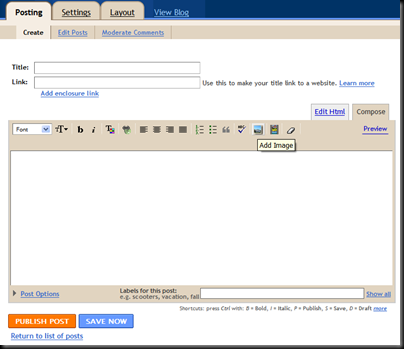
Assuming you have a Google blogger's account, blogging with images is dead simple. With the USB reader for your phone's memory card, you just upload the image, add the title, the text and just press the 'Publish Post' button.

image

A more efficient way is to use Google's Mail-to-Blogger feature. This way you can check your emails and blog at the same time.

image

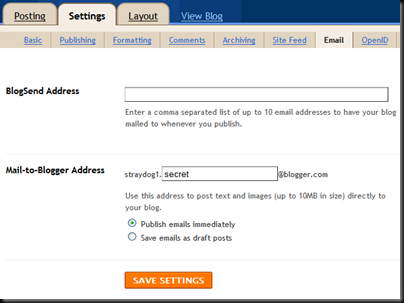
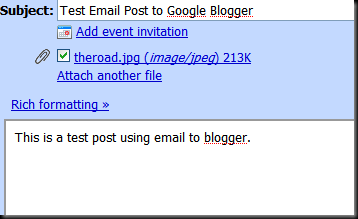
Setup an unique email address to post your blog under Settings -> Email. Any mail sent to this address will be posted immediately to your blog. So an mail with an photo attachment like below:

image

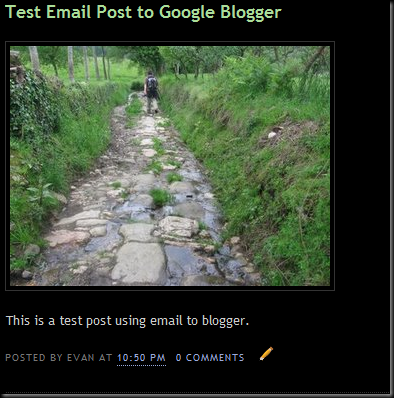
Will end up in your blog like this with the subject of the mail becomes the title in the blog.

image

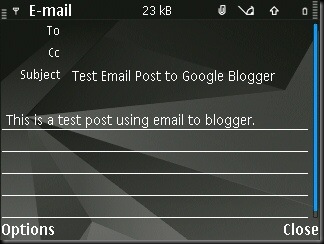
Similarly on a mobile device with email capability, the screen might look something like this:

Scr000002

With a mobile device, I have the advantage of writing the posts as draft emails in advance and dispatch them out the moment I am connected to a free wlan at the library or cybercafe. In other words, if I have 2 days without internet connection, I don't have to spend extra time filling in the back logs. In addition, the photo(s) are attached directly from the phone's memory card so there's no fumbling with USB card readers.

This is what they called moblog (mobile blogging).

If you have email application on your phone but no wlan, don't use this as the cost is exorbitant for accessing the internet via the cellular network.

Technorati tags: , ,

Blogging On The Camino - Internet Access (Part 2)

On the Camino Frances, a few albergues have coin operated internet terminals. They are usually expensive (one Euro for only 15 minutes) and a closed system (no USB port to plug in any device).

image

A better way is to head for the local library (Bibloteca). They are free and most cities and town with a decent population in Spain will have one. They are usually closed after 2 pm and open again after 5 pm so you can take your siesta first and come in later in the evening.

image

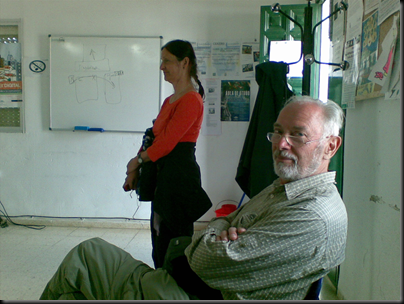
You might have to wait your turn. Pilgrims are a patient bunch, no?

Alternatively, the majority of the libraries in Spain has unsecured free wlan (wireless lan) access. If you have a phone with wlan you don't have to wait. That way, you also allow the local kids to have more time on the computer. However, phone with wlan are not cheap.

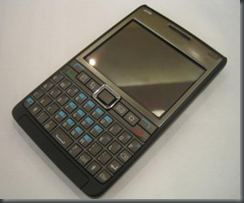
The picture above is my Nokia E61i. All Nokia E-Series phones comes with wlan. Here is a partial list of all the phones with wlan support. The screen are small and they do require some technical know how to set up and operate. This may not be for everyone. Hopefully technology will make it easier in the future for just about anyone to use it. But for those who can hack this, here's what you can do right now with just 1 device (the really cool stuff are from point 5 onwards):

  1. Phone.
  2. Camera.
  3. Alarm clock.
  4. mp3 player.
  5. Ebook reader. (Read Paulo Coelho's The Pilgrimage during my last camino)
  6. Mail. (Including blog posting, more on that later)
  7. Light web browsing
  8. Voip (Skype or equilavalent). Cheap 2 cents a minute call anywhere in the world provided if you can put up with slight voice communication delay.
  9. Able to access the internet on Sunday even when the library is closed (provided the wlan signal is still strong from outside the library).

Next - Blogging On The Camino - With Google's Blogger (Part 3)

Technorati tags: , ,

Blogging On The Camino - Photos (Part 1)

Times has changed. No longer are blogs restricted to just text. Photos have become ubiquitous in all blogs.

Should you bring along a digital camera? Or camera phone? Unless you are photography buff, a 2-3 megapixel camera phone will do just fine for prints and also for blogging. That way you only need to carry 1 charger on the camino. The only requirement is that your phone must have support for external memory card for storage.

image

The external memory card that is bundled with the phone are usually small (around 256-512 Meg). Quadruple the capacity by investing around 30 USD for a 2 Gigabyte card. On my 2 megapixel camera phone, the estimate is around 4800 photos! That's more than enough for a few caminos without having to remove any photos from the card.

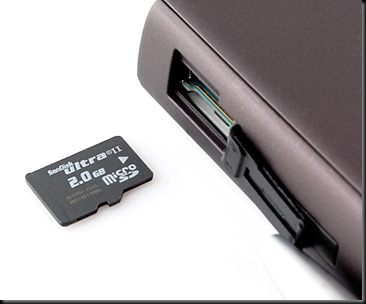
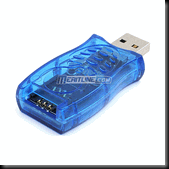
There are different types of memory cards for the camera phone. The newer the phone, the smaller the card tends to be. They are basically SD (small), MINI-SD (smaller) or MICRO-SD like in the photo above (tiny). Make sure you have a USB reader for the card. If you buy an additional MICRO-SD card, they usually throw in the reader for free. If not, a USB reader usually cost only a couple of dollars.

image

With the USB reader, you can plug it into any computer during your camino and have access to the photos stored in the card. This is also necessary if you want to post images to your blog. And at the end of your camino, you can use the reader to move your photos from your camera phone to your computer.

Next - Blogging On The Camino - Internet Access (Part 2)

Technorati tags: , ,